01 · Show
“On the MNT Reform, show me where the 3.3 V goes.”
The rail lit across the whole board
37 pins of +3V3, from the U12 regulator to the last capacitor. Zoom, flip the board, tap a part: the assistant knows which one.
wb_show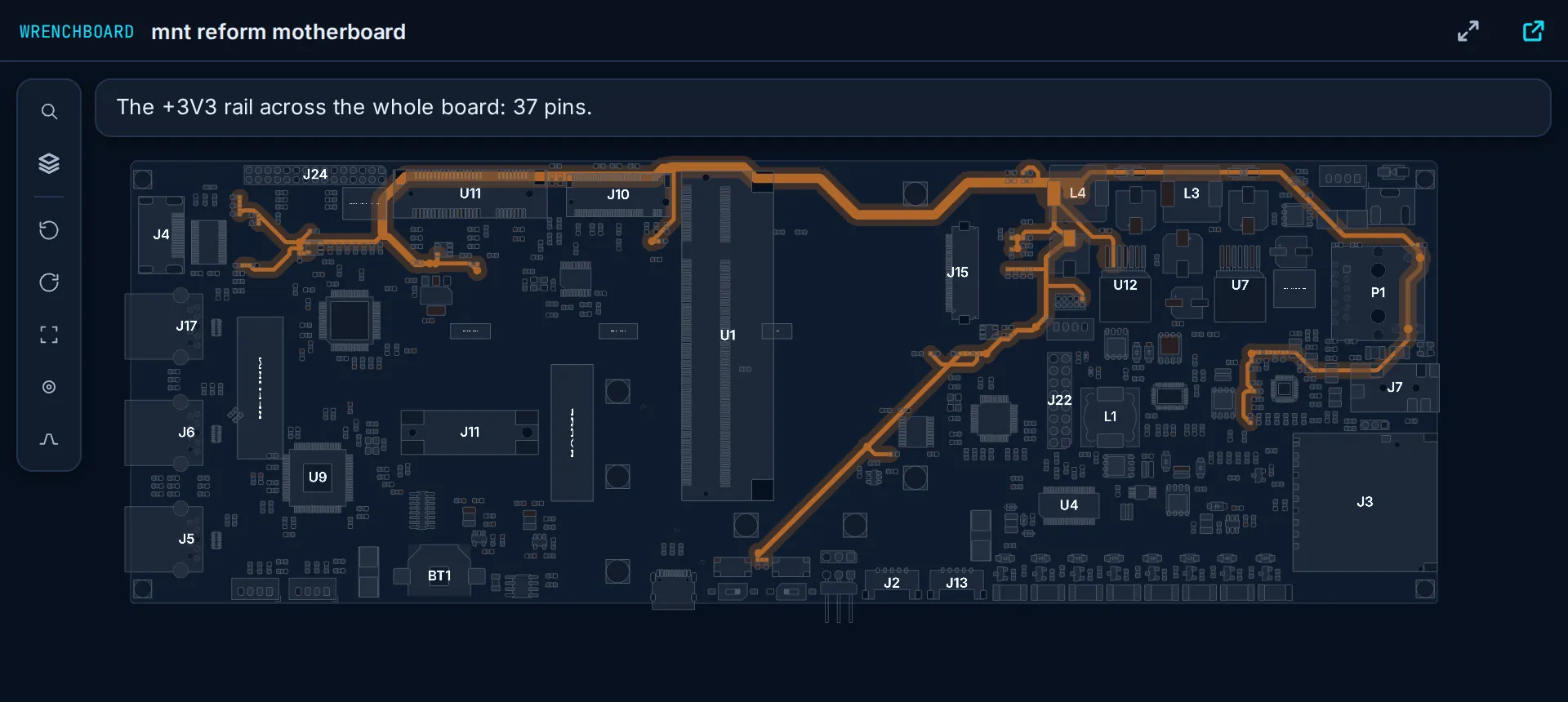
The hosted MCP connector for board-level repair. Your assistant reads the real copper of .brd, .fz, .tvw and .pcb boards, shows you where to probe on the board itself, and keeps the repair file. Nothing to install.
“On the MNT Reform, show me where the 3.3 V goes.”
37 pins of +3V3, from the U12 regulator to the last capacitor. Zoom, flip the board, tap a part: the assistant knows which one.
wb_show“Where is C19?”
The camera lands on the part and the expected value sits next to it. No more hunting among 505 parts, and the view follows your assistant's theme.
wb_component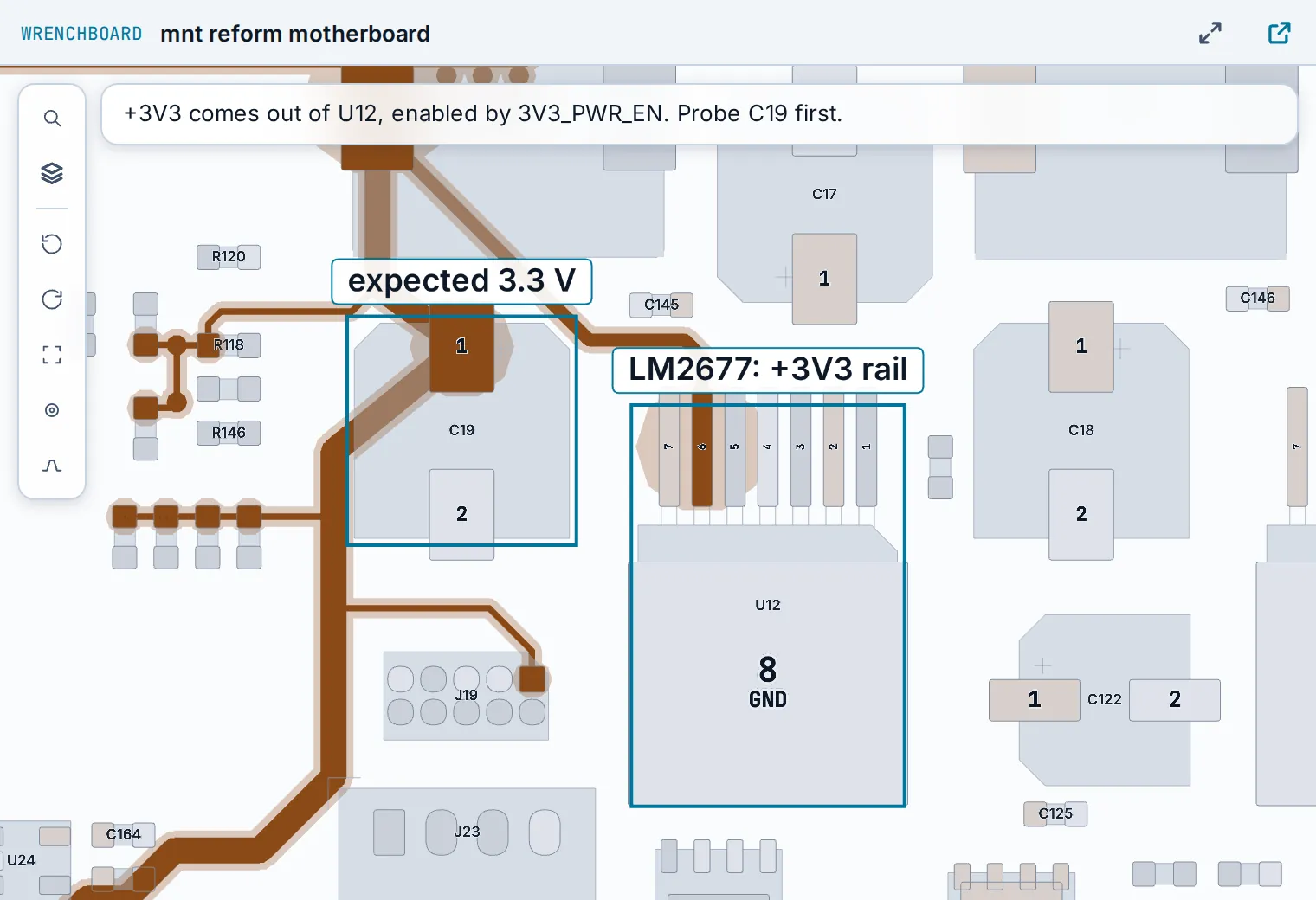
“Dead board, no boot. Where do I start?”
The readings in order, from the most telling to the finest. Type the value in the view: it goes back to the assistant and into the repair file.
wb_propose_protocol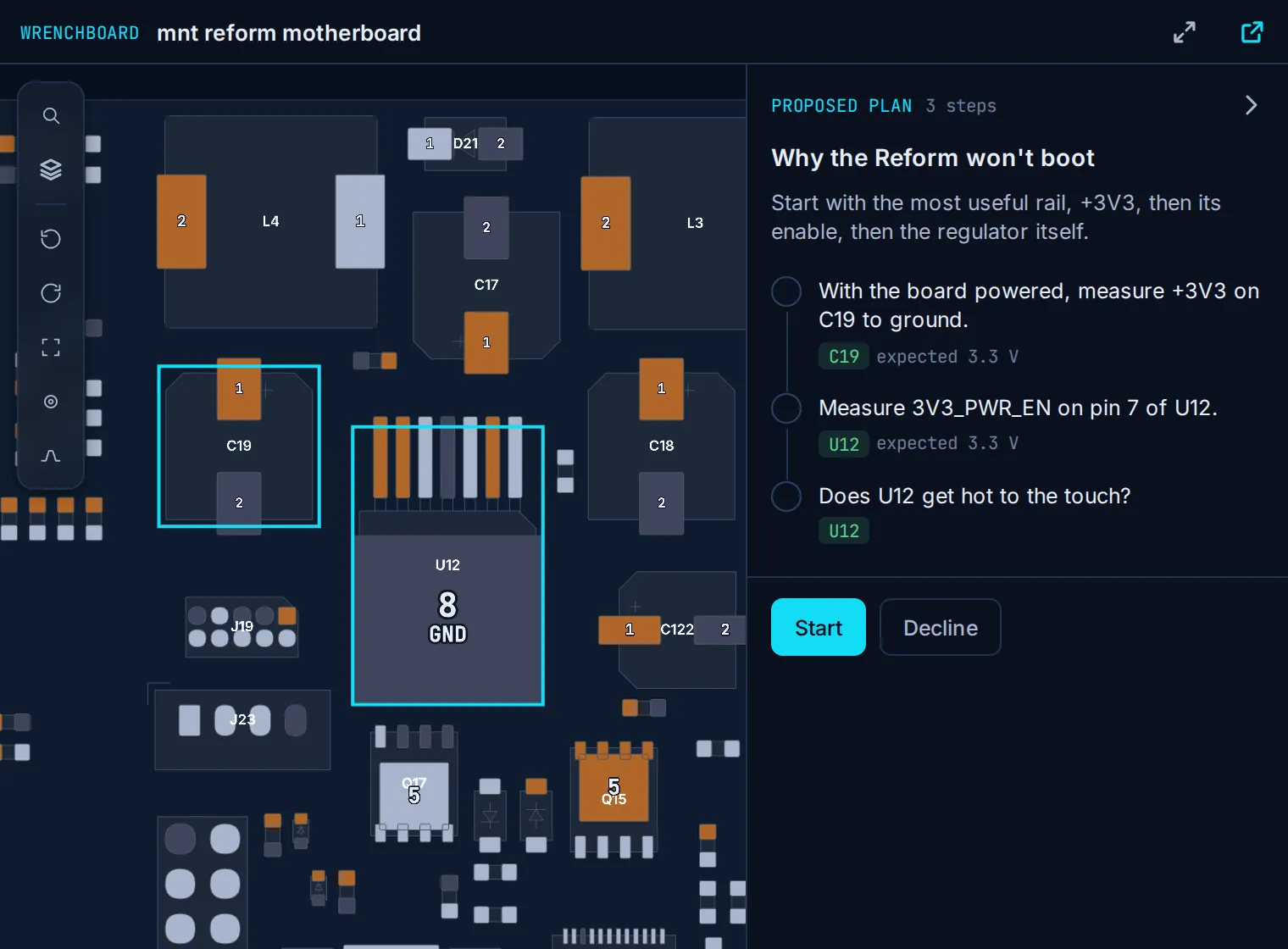
“0 V on C19. Where does that 3.3 V come from?”
Arrows, labels, a caption: the regulator's input, its enable, then the point you just probed. You know where to put the probe next.
wb_scene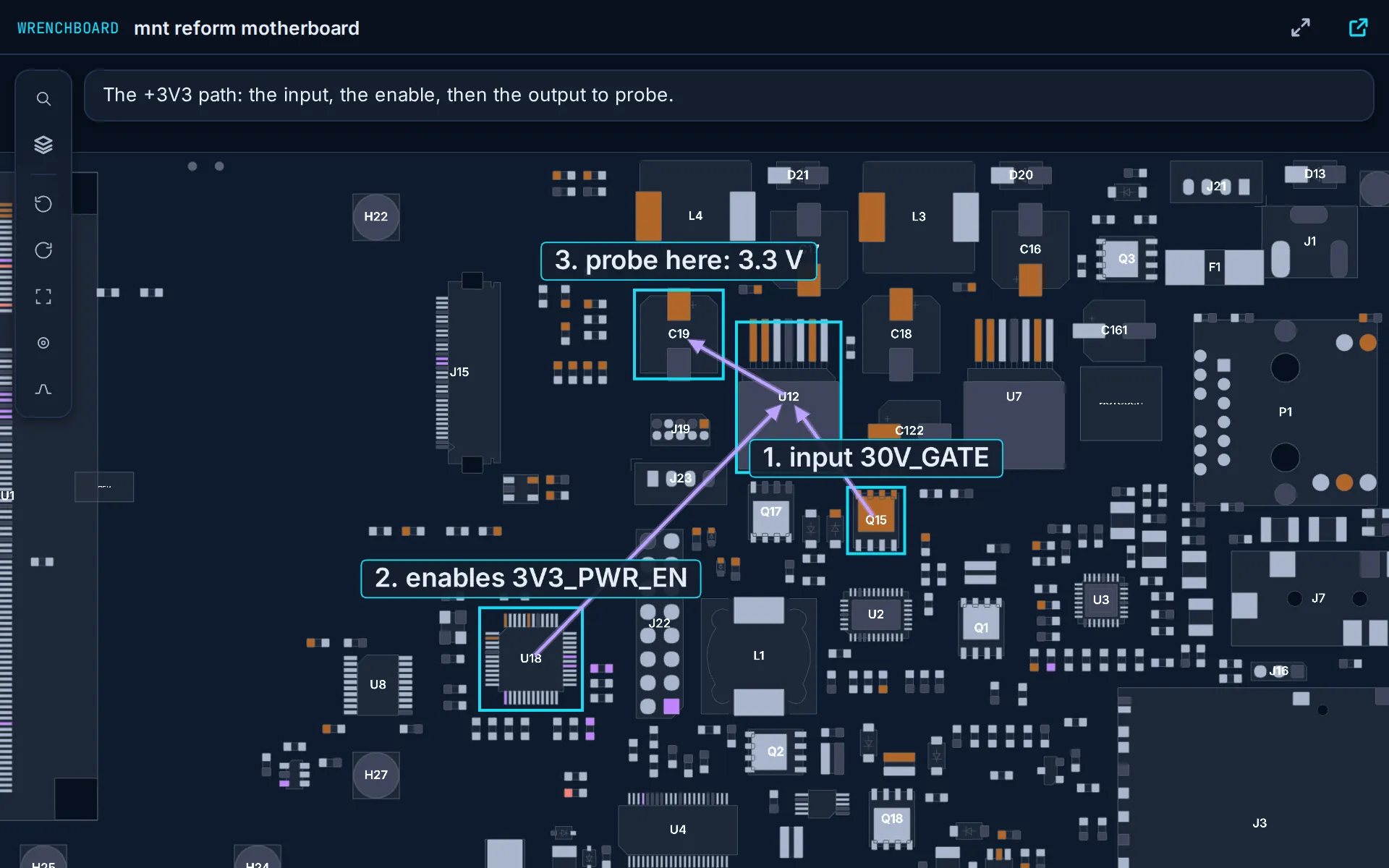
Open, show and read your boards, nets and rails 25 times a day. The diagnosis is in Pro.
What Pro adds →One address to paste. It works in the web, desktop and phone apps, not only in a terminal: no local server to build, no file to convert.
https://app.wrenchboard.cloud/mcpUpload the file from the conversation: it lands in your workshop, encrypted, and the board opens.
https://app.wrenchboard.cloud/mcp Available on every Claude plan. The free plan allows one custom connector.
https://app.wrenchboard.cloud/mcp ChatGPT needs developer mode. At the time of writing, OpenAI documents full support, recording readings and repairs included, on Business, Enterprise and Edu, and read-only access on Pro.
https://app.wrenchboard.cloud/mcp In Grok's Android app the board view opens, but its import button opens nothing: ask the assistant for the upload link and open it in your browser.
https://app.wrenchboard.cloud/mcp Needs GitHub Copilot in VS Code. The board view opens in the chat.
https://app.wrenchboard.cloud/mcp https://app.wrenchboard.cloud/mcp Le Chat shows no board view in the conversation: the assistant gives you a link that opens the board in your browser.
claude mcp add --transport http wrenchboard https://app.wrenchboard.cloud/mcp Claude Code has no board view in the conversation: the assistant gives you a link that opens the board in your browser.
{ "mcpServers": { "wrenchboard": { "url": "https://app.wrenchboard.cloud/mcp" } } } Cursor opens the board by link, in your browser.
codex mcp add wrenchboard --url https://app.wrenchboard.cloud/mcp && codex mcp login wrenchboard Codex opens the board by link, in your browser.
openclaw mcp set wrenchboard '{"url":"https://app.wrenchboard.cloud/mcp","transport":"streamable-http","auth":"oauth"}' && openclaw mcp login wrenchboard OpenClaw opens the board by link, in your browser.
MCP is the open standard that links AI assistants to services. WrenchBoard speaks it: any assistant that accepts a remote MCP connector with an OAuth sign-in can use it. Only the way the board is displayed changes.
The board view opens in the thread, the assistant moves it, the test plan runs on it and your readings go back to the assistant.
All the tools work the same. To see the board, the assistant gives you a link that opens it in your browser, already marked up.
What is physically connected, read from the boardview.
wb_startwb_board_infowb_railswb_netwb_componentPower tree, known faults, ranked hypotheses.
wb_schematicwb_known_faultswb_hypothesizeOne view the assistant moves: a rail lit, a part framed, values pinned.
wb_showwb_scenewb_upload_linkOpen, measure, conclude, close. Visible afterwards in your WrenchBoard workshop.
wb_list_repairswb_get_repairwb_start_repairwb_record_measurementwb_record_findingwb_close_repairThe steps appear on the board, you enter the reading, the assistant moves on.
wb_propose_protocolwb_record_stepwb_update_protocolAnswers a free account. wb_net and wb_rails: 25 reads a day.
The reasoning runs on your Claude, ChatGPT or Grok plan. The connector never uses your WrenchBoard assistant credits. When a free account asks for a Pro tool, the assistant says what Pro would have done, with the link.
Full details in the privacy policy.
Yes. The WrenchBoard connector is a hosted MCP server for board-level repair: paste https://app.wrenchboard.cloud/mcp into Claude, ChatGPT, Grok or any assistant that accepts a remote MCP connector. It reads 14 boardview formats, including .brd, .fz, .tvw, .bdv and XZZ .pcb, and shows the board inside the conversation.
Add the connector, sign in to WrenchBoard, then ask the assistant for an upload link. The file goes into your workshop, encrypted, and the board opens in the conversation. Boards already in your workshop open by name.
The same 14 as the WrenchBoard viewer: .fz, .tvw, .brd, .brd2, .bdv, .cad (GenCAD), .kicad_pcb, .pcb (XZZ), .bv, .gr, .f2b, .bvr, .asc and .cst. No conversion step.
A local server runs on your computer, often has to be built from source, and only works in desktop or coding assistants. WrenchBoard's is hosted: it works in the web and phone apps of Claude, ChatGPT and Grok, draws the board in the conversation, adds the analysed schematic and keeps the repair file.
Not for Claude: custom connectors work on every Claude plan, and the free plan allows one. ChatGPT needs developer mode, and recording readings and repairs needs a plan with full MCP support (Business, Enterprise or Edu at the time of writing). xAI opens connectors to every Grok account; on Business and Enterprise an admin adds them first.
Yes, a free one, with a confirmed email address. A connector stays open for months, so it only plugs into an address you have confirmed. If yours is not confirmed yet, the sign-in page sends you a six-digit code and the connection carries on.
Same boards, same method. In the workshop it is our assistant and your credits. With the connector it is yours, and the repair file stays shared between the two.
The copper is enough for most diagnostics. With an analysed schematic the assistant gains the power tree, the boot order and ranked hypotheses.
Yes. It only names parts read on the board and says where each claim comes from, but its conclusions stay indicative. You remain in charge of every intervention on the hardware.
Claude and Claude Code are trademarks of Anthropic. ChatGPT is a trademark of OpenAI. Grok is a trademark of xAI. The other names and logos shown belong to their respective owners. WrenchBoard is not affiliated with, sponsored or endorsed by any of them; their names and logos only say which assistants the connector works with.