Schematics · electrical graph
Your schematic, turned into an electrical graph.
A schematic PDF is a drawing. It knows where the ink sits, not that C29 hangs off the same rail as U7. WrenchBoard reads the pages and compiles what they mean into a graph the diagnostic agent can question: which pin sits on which net, what feeds what, and what goes dark when one rail drops.
Start free01The drawing
A schematic PDF is a drawing, not data
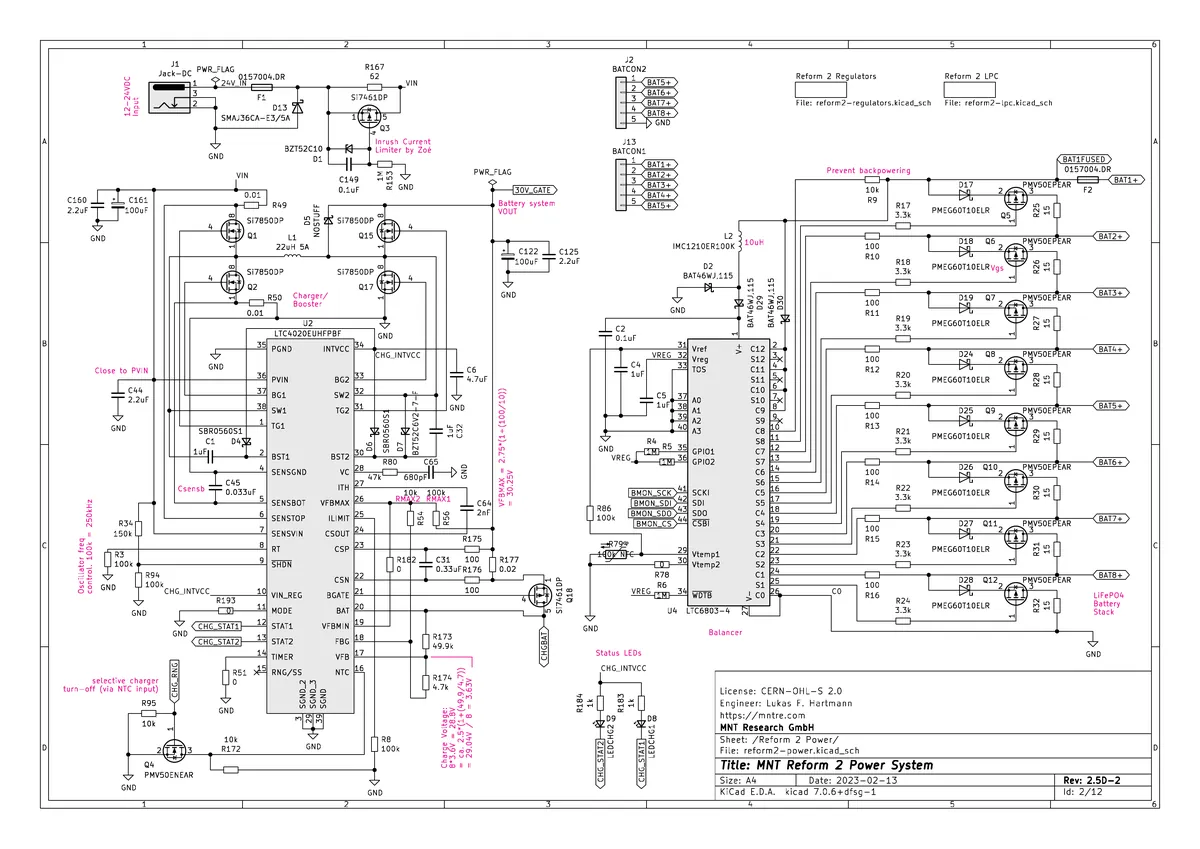
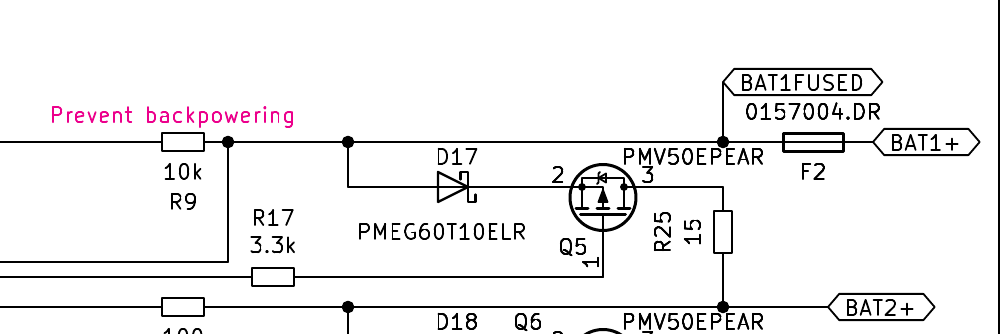
Open a mainboard schematic and you get forty to two hundred pages of vector ink. A human reads it fluently: this line leaves pin 14, crosses two sheets under the same label, and lands on a filter cap. The file itself knows none of that. It knows glyph positions. Nothing in it says that PP3V3_S5 on page 12 and PP3V3_S5 on page 74 are one net, and nothing says which component bodies those pin numbers belong to.
That gap is why schematic work is slow at the bench. The knowledge is on the page, and every question you have costs a search through pages that were never built to answer questions.
 ×4
×402The compile
What happens when you add a schematic
The pages go through a pipeline, and each stage answers a narrower question than the one before.
- Render. Every sheet is rasterized at working resolution, because part of what matters is drawn rather than written: bus bars, ground symbols, the shape of a connector fan-out.
- Extract the text. The PDF’s own text layer is read out with its coordinates. This is the authority on spelling: it is where
PP3V3_S5comes from, exactly as the CAD tool wrote it, not as a model guessed it. - Read the drawing. A vision pass covers what the text layer cannot express, the topology: which label belongs to which wire, which wire reaches which pin.
- Merge, then compile. The two readings are reconciled, sheet references are followed so that one net split across pages becomes one net, and the result is compiled into an electrical graph: components, pins, nets, and what connects them.
The output is not a summary of your schematic. It is a structure with the same shape as the circuit.
03The questions
What the agent asks the graph
Once the graph exists, the diagnostic agent stops guessing and starts querying. It pulls a component and gets its real pins with the nets attached, narrowed when the part is a SoC or a PMIC whose pin list runs into the hundreds. It walks a rail backwards to find what feeds it. It asks what else drops when this net drops, which is how a single dead rail turns into an ordered list of suspects instead of an afternoon of probing.
When a boardview is loaded too, the two sides meet: the graph says which net to check, the boardview says which pad to put the probe on, and the agent highlights it on the board rather than describing it.
04Any board
Any board with a schematic, not just laptops
Laptop and phone mainboards dominate because they are the best documented, not because the pipeline knows anything about computers. It reads sheets, labels, pins and wires. An amplifier board, an industrial controller, a power supply: if a schematic exists, the same pipeline builds the same kind of graph from it.
05The cost
What is free, and what is not
Analysing a device the catalogue already covers costs nothing and opens instantly, because that analysis was done once and is shared. Analysing a device nobody has covered yet is the expensive step, and it sits behind a paid plan with a monthly cap per shop and a daily ceiling overall. That is the honest trade: the build is the costly part, so it is gated. The graph and the protocols that come out of it are not, and the agent runs within your plan’s monthly AI budget.
Watch it work
The same agent, on a real board
This is not a mockup, it is the bench itself with its own interface, running on the MNT Reform pack exported from the engine: 487 real components and 2066 real pads. Every step below is what the engine answers on this board, from the device's rules for the symptom to the schematic graph behind the input fuse F1 and the board net it feeds. Here is what the agent does with a board that will not power up.
Eight tool calls, each one a real answer from the engine on this board, and not one component named from memory.
FAQ
Frequently asked questions
Is this a schematic viewer?
It shows them, and it does more than that. You can open the pages you added, and the agent can pull up a precise area of a precise sheet while it reasons. But the point is what sits underneath: the pages are compiled into an electrical graph, so a question like "what else is on this rail" is answered from the topology instead of from you scrolling forty pages.
Which files can I add?
PDF for schematics. Boardviews come in through their own door, fourteen formats parsed natively. A device can have both, and that is when the picture is most complete: the boardview gives the physical side (refdes, pads, where to put the probe); the schematic gives the electrical side (what is connected to what).
Do I need a boardview as well?
No. A schematic alone builds the electrical graph, and a boardview alone gives you the board with refdes search and net highlighting. Together they cross-check each other, and the agent can walk you from a net on the schematic to the pad you actually touch.
Which boards does this work on?
Any electronic board you have a schematic for. Laptop and phone mainboards are the best documented, so they come up most, but nothing in the pipeline is specific to a computer: audio gear, an industrial controller, a power board. If there is a schematic, there is a graph to build from it.
Does my schematic stay private?
Yes. Your uploads are tenant-private and never shared. Only the electrical understanding WrenchBoard builds from public schematics feeds the shared catalogue.
What if my device has never been analysed?
A device already in the catalogue opens instantly and costs nothing: the analysis has been done once and is shared. A device nobody has analyzed yet starts a new build, which is the expensive step and sits behind a paid plan with its own monthly and daily ceilings. Once it is built, it stays built for you, and for everyone after you when the schematic is public.
Get started
Try Wrench Board free, in your browser.
Free plan, no card required. Open the app, pick a covered device, and start a diagnostic session with the agent.