Guide · AI at the bench
Using AI on a board, without made-up answers.
A general chatbot answers the same way whether it read your board or not. Here is the method that changes that: every claim out of a lookup, each kind of data handled for what it actually knows, and an output shaped like the evidence instead of a paragraph.
Open a board and try it01The failure
Why a general chatbot fails on a board
Ask any general model where the input fuse sits on a laptop mainboard it has never seen. It will answer. It will give you a reference designator, a location, and a tone of voice that sounds exactly like the one it uses when it is right.
This is not a flaw you can prompt your way out of. A language model produces the most plausible continuation, and on a board, plausible is cheap: refdes look alike, power rails are named the same way across vendors, and C29 exists on almost every board ever made. The model has no mechanism for saying “I could not find it”, because nothing in it ever looked.
At the bench the cost is not an embarrassing answer. It is a desoldered component that was fine.
02The rule
The rule that changes everything: it may only speak from a lookup
The fix is architectural, not conversational. Every component the agent names has to come from a tool call against your actual parsed board or the schematic graph built from your actual schematic. Not from its training, not from its memory of the conversation.
Two layers make that hold in WrenchBoard. The tools themselves never invent: ask for an unknown refdes and they return “not found” with the closest matches, which forces the agent to pick from real ones or ask you. And on the way out, anything shaped like a refdes is checked against the parsed board, so a token the board does not contain reaches you marked as being verified instead of stated as fact.
That is the whole difference between an assistant that helps and one that is confidently wrong, and it is worth checking for in any tool you evaluate: ask it about a component that does not exist on your board. A grounded tool says it cannot find it. A chatbot describes it to you.
03The data
Each kind of data answers a different question
This is the part most people get wrong, because it is tempting to treat every file as “context to paste in”. Each format carries a different truth, and loses its value the moment it is flattened into text.
- The boardview knows geometry. Where the pad is, which pads share a net, what sits on the other side of the board. It does not know what any of it does.
- The schematic knows topology. What feeds what, which rail collapses when this one does, what a pin is supposed to be. It does not know where to put your probe.
- The photo you just took knows the present. The corrosion, the reballed chip, the previous tech’s jumper wire. None of that is in any document.
- The datasheet or the service manual knows intent. What the part was designed to do, what the factory expected to measure.
- The web knows the collective. That this model has a known failing regulator, that a batch had bad pads. Useful, unverifiable, and to be treated as a lead rather than a fact.
An agent that handles all five as one undifferentiated blob of text gives you an average answer. One that keeps them apart can cross them: the schematic says this net should be at 3.3 V, the boardview says the closest pad is here, your photo says that pad is corroded, and suddenly the measurement to take is obvious.
04Looking
Looking is a tool, not a paragraph
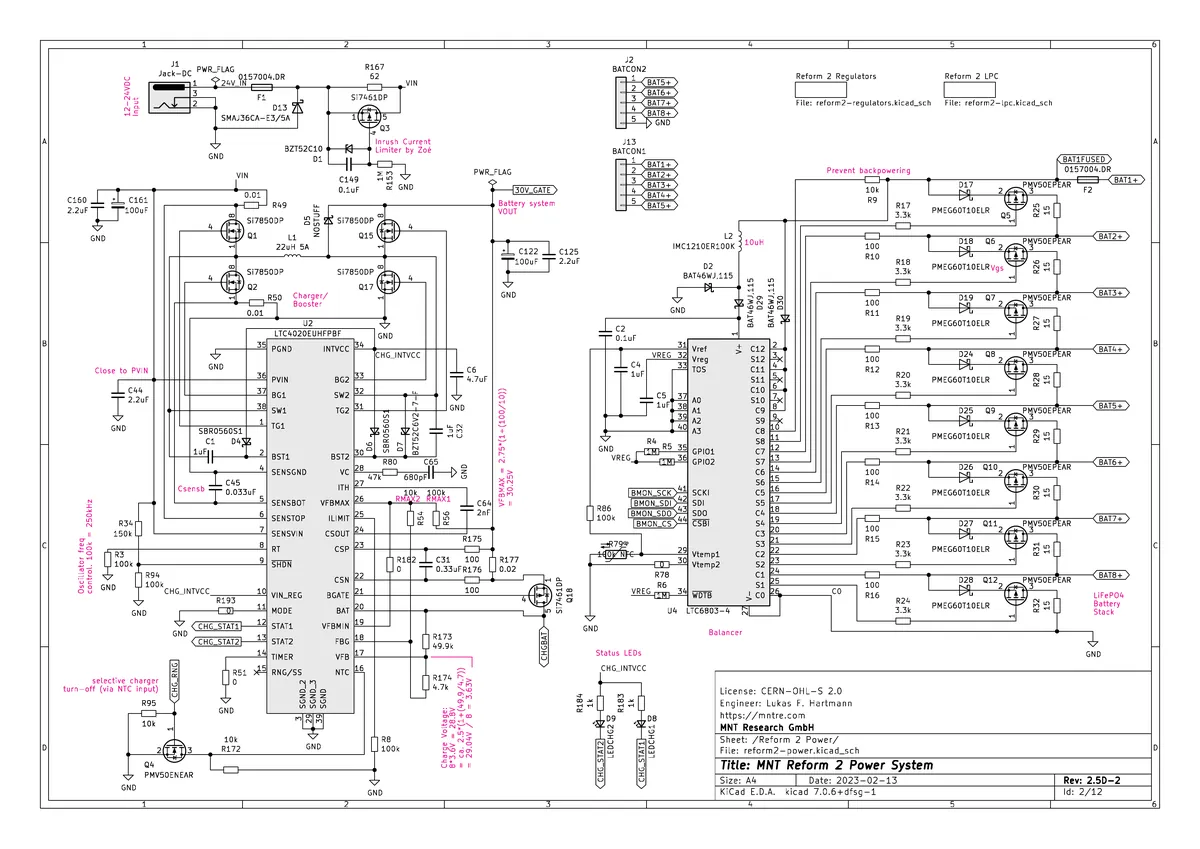
A schematic page is not readable as text. The information is in the layout: which line leaves which pin, which label sits on which wire. So the agent does not get a transcript of the page, it gets to look at it, and to frame what it looks at, zooming into a region of a sheet the same way you would move a magnifier over a printed schematic. Same for your photos: it frames the area it needs rather than squinting at a whole board at once.
That is also why the answer should never be “somewhere near the CPU”. It should be a sheet, a region, and a component.
 ×4
×405At the bench
How to work with it, in practice
Give it the symptom, not your diagnosis. “Dead, no LED, 20 V adapter plugged in” is worth more than “I think the PMIC is dead”. The second one narrows the search to your hypothesis, which is exactly what you want checked.
Measure what it asks, in the order it asks. The order is not arbitrary: each measurement is chosen to eliminate the largest branch of the fault tree. Taking them out of order costs you the elimination.
Report failures as precisely as successes. “0 V” and “OL” are different facts, and a protocol step that fails tells the agent more than one that passes.
Push back. A grounded agent can be contradicted with a measurement, and should change its ranking when you do. If yours defends its first hypothesis against your meter, you are not using a diagnostic tool, you are arguing with an autocomplete.
06The loop
A reading is not a reply, it is a row
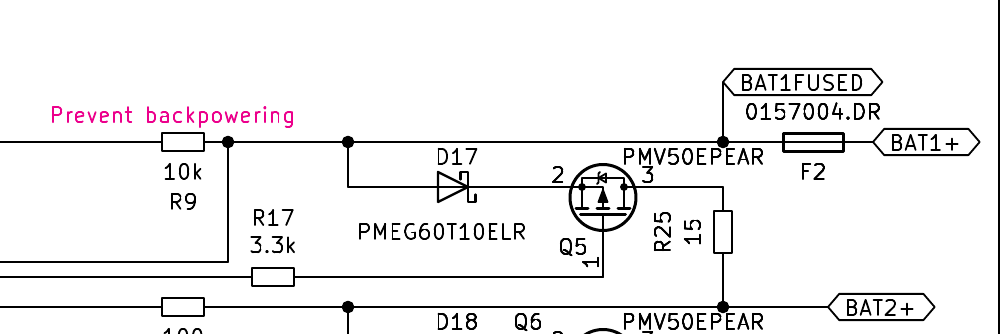
The board and the chat are the same room. Point at any pin in the inspector and it rides into your next message as a chip, F2 pin 1 (BAT1FUSED). You never type a refdes, the agent never has to guess which F2 you mean, and when one of its views offers a measurement the button hands the target straight back to it. That is the part people expect to be a demo trick: the two halves are wired, so a reading taken on the board lands in the agent’s context without passing through your keyboard.
Say “F2 reads OL” and a grounded agent does not simply agree with you. It calls a tool that writes the reading down: what was measured, on which part or pin, what was expected, and a fault mode the engine classifies on its own: open, short, dead or degraded. The reading becomes a row in this repair’s journal, attached to the thing it was taken on.
Three things follow, and together they are the whole argument for a tool over a chat window.
The next ranking reads it. Ask for hypotheses again and the observations come back in with them. The order changes because a fact changed, not because you pushed. That is what a ranking is for.
The next session reads it too. The journal is queryable, so a board you saw six months ago does not start from zero, and neither does the next board with the same symptom on the same model.
And nothing gets retyped. The measurement you took on the bench is the measurement the report prints, the one the protocol marks done, and the one the knowledge base keeps. You entered it once.
This is the part that does not show in a demo, and it is the part that decides whether an agent is useful at a bench: the tools and the data are the same object. A schematic graph that answers by net, a rule base that answers by symptom, a journal that can be written and re-read, a boardview that can be pointed at and measured on. A model with none of that has to guess. A model wired to all of it can measure, and can be proven wrong.
The reading rides along with your next message
BAT1FUSED · 0 V · 14:02 You do not retype it, and the agent reads it before it answers.
07The model
Where this leaves the model
Notice what the model is not doing in any of this. It is not remembering your board, it is not recognizing it from a photo, it is not recalling a repair from its training. It is choosing which tool to call next, reading what comes back, and deciding what is worth measuring. The knowledge lives in the graph, the rules and the journal. The model brings the reasoning.
That is also why an answer should not look like a chat transcript. An expected value against a measured one, a ranking with its numbers, a protocol with its steps: the shape of the evidence, not the shape of a conversation.
Watch it work
The same agent, on a real board
This is not a mockup, it is the bench itself with its own interface, running on the MNT Reform pack exported from the engine: 487 real components and 2066 real pads. Every step below is what the engine answers on this board, from the device's rules for the symptom to the schematic graph behind the input fuse F1 and the board net it feeds. Here is what the agent does with a board that will not power up.
Eight tool calls, each one a real answer from the engine on this board, and not one component named from memory.
FAQ
Frequently asked questions
Can I just paste my schematic into ChatGPT?
You can, and it will answer. The problem is that it answers the same way whether it read your board or not. A general model has no way to tell you that it could not find C29, so it produces a plausible C29. On a board, a plausible answer costs you a dead component and an afternoon. What changes the outcome is not a better model, it is a model that can only speak from a lookup.
What does 'grounded' actually mean here?
That every reference designator the agent shows you came out of a tool call against your parsed board or the schematic graph, never out of its memory. When a refdes cannot be verified, it is marked as being checked rather than asserted, and the check happens on the whole sentence before it is confirmed. That guarantee is in the engine, not in the prompt.
Why does the type of file matter so much?
Because each one answers a different question. A boardview knows where a pad is, not what it does. A schematic knows what is connected to what, not where to put the probe. A photo knows what your board looks like today, including the corrosion nobody documented. A datasheet knows what a part is supposed to do. An agent that treats all four as 'text to read' throws away exactly what made each of them useful.
Should I use the deepest reasoning tier every time?
No, and it is not about saving money. A deep tier on a question that needs one lookup produces a long answer built on one fact, which reads as more certain than it is. Depth pays when the board resists: a symptom with several candidate causes, a rail that drops under load, a repair that already failed once.
Does the AI replace my skills?
No. It replaces the hours you spend hunting through PDF pages for the one net that matters. You still probe, you still read the meter, you still decide. The agent's job is to make sure the next measurement you take is the one that eliminates the most branches.
What is it still bad at?
Anything the documentation does not contain. A board with no schematic and no boardview leaves it with your photos, your measurements and general electronics knowledge, which is a real but much thinner help. It also cannot see a cold joint or smell burning. And it will not know that this exact batch of boards has a known weak pad unless somebody recorded it.
Get started
Try Wrench Board free, in your browser.
Free plan, no card required. Open the app, pick a covered device, and start a diagnostic session with the agent.